RAVEN technical support
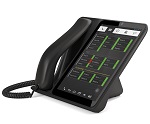
(GDP-08 model)
Elegant desktop smartphone designed for office use.
Raven is a SIM operated desktop phone which combines comfortable use, intuitive touch interface, flexibility, elegant design and advanced features like cloud administration or support of professional EHS handsets.
| Android | 4.2.2 |
| Mobile network | 850/900/1800/1900 MHz, HSDPA 900/2100 MHz |
| screen | 8-inch (1280 x 768) multitouch |
| videoconferencing | 0.3 Mpx Front camera, Speaker, Microphone |
| wifi | 802.11 bgn |
| bluethooth | 4.0 |
| memory | 1 GB RAM, 4 GB + microSD up to 32 GB |
| processor | Quad-core A31S 1.0 GHz |
| headset support | EHS DHSG standard, Bluetooth |
| advanced call functions | Caller ID, Mute, Hold, Conference Call, Call Waiting, Call Divert, Explicit Call Transfer |
Videos
-
Raven in action YouTube link

-
Raven v akci YouTube link

-
Call transfer via Switchboard YouTube link
Downloads
| Raven leaflet | Raven quick guide |
 |
 |
 |
   |
| Raven technical specification | Phone solution |
 |
For leaflets and presentations visit Jablocom Phone Solution |