Install Jablotool USB SW
I would like to connect my device to the PC via USB cable. How can I install or update JabloTool SW?
(only for GDP-04 and EYE-02 models)
How to install JabloTool SW
- Download JabloTool desktop SW from download,
- Install the SW. (Check here if JabloTool USB SW is supported by your operating system.)
- Connect device by USB cable to your PC when installation is finished.
How to update JabloTool SW
-
- Open JabloTool
- Click on the round icon in the upper left corner, choose Check for updates from the menu
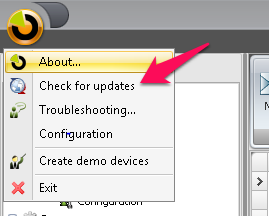
- JabloTool will offer you to update the SW if newer version is available.