Reporting from camera is delayed
Reporting of my EyeSee camera is delayed, what should I do?
- Reduce the number of events
- Check the list of events of your camera. If there are too many alarms, check which detector causes alarms. Login to JabloTool.com and click on your camera. You will see the list of alarms (and which detector triggered them) on the right side of the page. If there are too many alarms, check which detector causes the alarms.
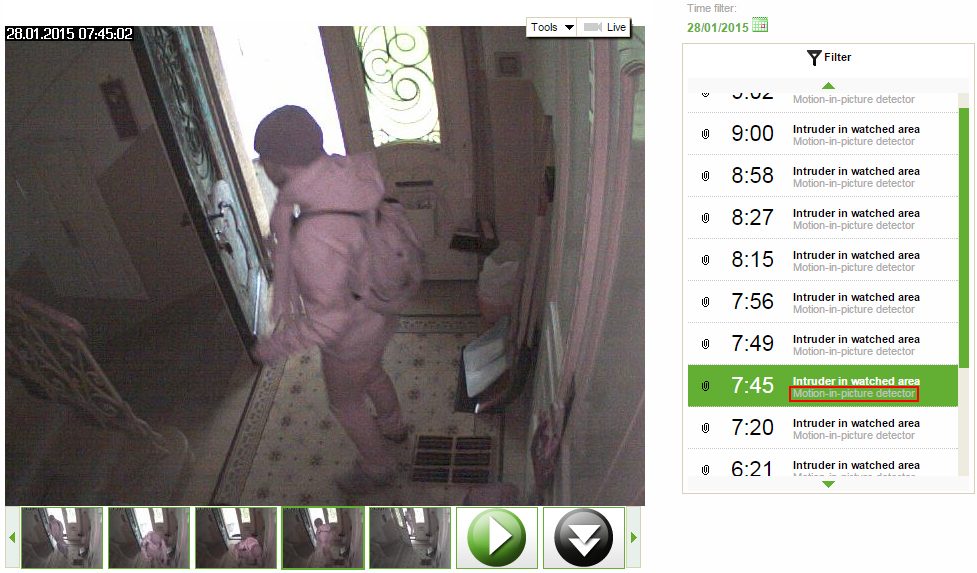
- Change configuration of that detector in Settings (Advanced) → Detectors. For tips on how to configure camera detectors see this FAQ.
- Reduce the number of contacts for reporting (select Reporting) and set level of reporting (Alarms, Extended, All) for each phone number and email.
- Choose only events you want to be informed about.
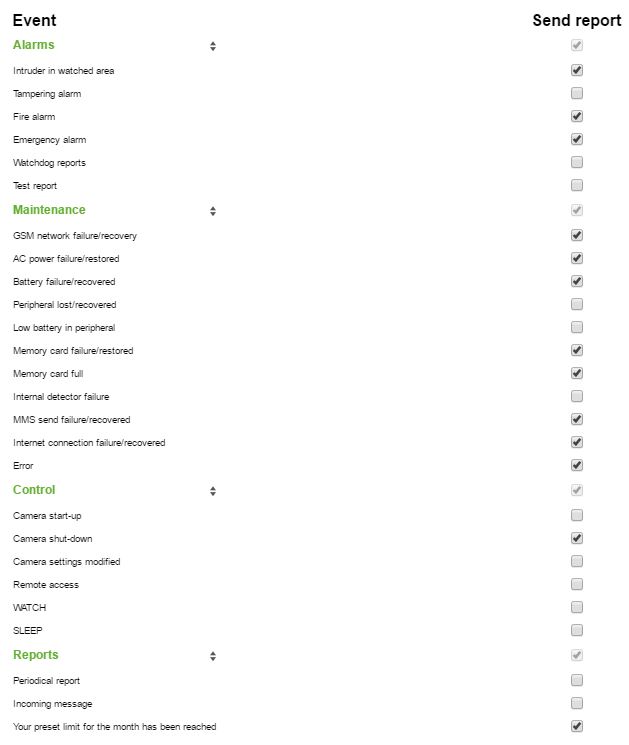
- Stay at JabloTool.com, select Reporting and choose Customized at the desired email or phone number.
- Tick only events which should be reported
- Improve the signal. If the camera has low signal the data connection is slow and unstable, thus the reporting is slow. For tips on how to find out and improve your signal please see post on improving camera signal.
- Use SMS instead of MMS or calls. (Select Reporting for your camera at Jablotool.com)
- Utilize Messenger service for sending emails (instead of camera). Sending of emails is for free. Messenger service can be used for SMS and MMS as well (one SMS costs 0,05 EUR and one MMS costs 0,25 EUR). To activate Messenger select Reporting at jablotool.com. For more information about Messenger activation click here.