Events remain in reporting queue
How can you stop camera sending me reports that are still in the reporting queue?
You adjusted the settings of the camera and it is now reporting one alarm after another even after you switched the camera into SLEEPING. Or you have switched the camera OFF and you know that camera will be sending you reports after you switch it ON again. It means there are unsent reports in the reporting queue. You can erase the reporting queue of the EYE-02 when you switch the camera into CONFIG mode.
You can switch your camera into CONFIG mode with your remote control. Press the buttons on your remote control at the same time as it is shown on the picture below
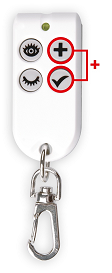
EYE-02 keyfob config mode
You can also switch the camera into CONFIG mode in JabloTool SW. Connect camera to your PC with USB cable and open JabloTool. Click on the icon of your camera and choose Advanced user. Then choose CONFIG.
Camera will not be sending you any reports when it is in CONFIG mode. After you switch the camera into CONFIG mode switch it back into WATCH or SLEEP mode.